




Gold Coast Amusement Force
Members
-
Joined
-
Last visited
Everything posted by Gold Coast Amusement Force
-
-
-
Pretty sure half the effects in the first part only started working properly after the maintance and the second part the water towers stream now goes over you and there is water coming out of bucket thing on the right so it’s showcasing the new or working effects. Sorry for not commenting, next time I’ll be sure to make some analogies
-
Exactly, I was leaving today and I can already say I would definelty rather be at top golf. Definetly targeted towards teens not families
-
Wild West Falls in its current state
-
Looking back, this is terrible photoshop but I'm just trying to start the conversation of how Dreamworld could theme the log ride with how much space there is.
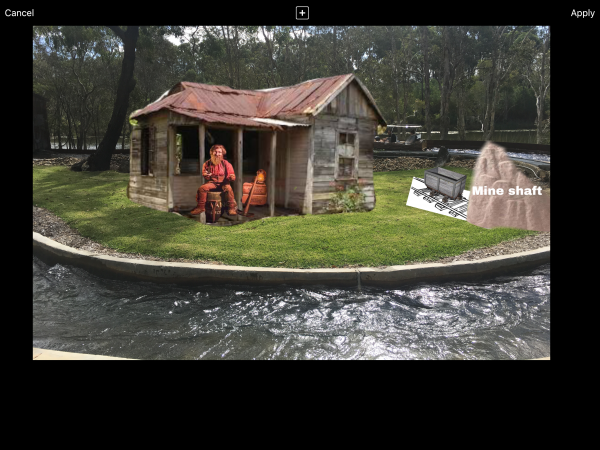 Here’s some concept art or clip art really.




Important Information
By using this site, you agree to our Terms of Use. We have placed cookies on your device to help make this website better. You can adjust your cookie settings, otherwise we'll assume you're okay to continue.
Account
Navigation
Search
Configure browser push notifications
Chrome (Android)
- Tap the lock icon next to the address bar.
- Tap Permissions → Notifications.
- Adjust your preference.
Chrome (Desktop)
- Click the padlock icon in the address bar.
- Select Site settings.
- Find Notifications and adjust your preference.
Safari (iOS 16.4+)
- Ensure the site is installed via Add to Home Screen.
- Open Settings App → Notifications.
- Find your app name and adjust your preference.
Safari (macOS)
- Go to Safari → Preferences.
- Click the Websites tab.
- Select Notifications in the sidebar.
- Find this website and adjust your preference.
Edge (Android)
- Tap the lock icon next to the address bar.
- Tap Permissions.
- Find Notifications and adjust your preference.
Edge (Desktop)
- Click the padlock icon in the address bar.
- Click Permissions for this site.
- Find Notifications and adjust your preference.
Firefox (Android)
- Go to Settings → Site permissions.
- Tap Notifications.
- Find this site in the list and adjust your preference.
Firefox (Desktop)
- Open Firefox Settings.
- Search for Notifications.
- Find this site in the list and adjust your preference.