


Leaderboard
-
Ogre
Members7Points492Posts -
Yyosh
Members5Points75Posts -
New display name
Members3Points8,183Posts -
MrLukeCarroll
Members2Points134Posts


Popular Content
Showing content with the highest reputation on 01/10/21 in Posts
-
7 points
-
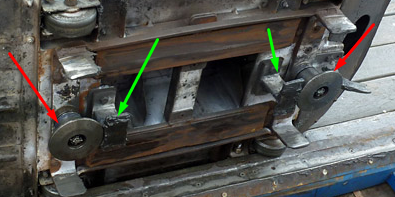
5 pointsDon't know anything about the design, but this photo on rcdb shows the underside of a car from the defunct Aussie World mouse which I'm certain is the same as the LPS mouse as they were built from the same designs. If I remember correctly, from the queue you can see the disc shaped 'bolts' (red arrows) spin which probably would mean they guide the car around turns, and the I shaped ones (green arrows) must just be upstops.
 5 points
 -
2 pointsCoasters can last for a very long term if politics, maintenance and economics are kind to them. You wouldn't put a coaster unless you expected to be able to spread that expenditure over a good period of years of operation. I can't imagine even internally they would put a use by date on a brand new coaster yet to open. Biggest thing going against it will be it's a first of it's kind model from a manfucaturer that hasn't been without it's maintenance nightmares in the past but it's lifespan should be in the decades if nothing else comes against it.2 points
-
2 points
-
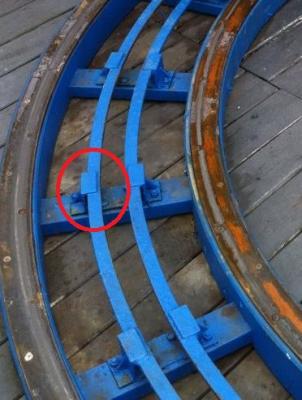
1 pointMy thoughts are- (only thoughts) The way the bracket sits on top if the centre guide rail makes me think the train has up stop wheels that run under the centre guide. It might just be a a bar. @GazzaShould know.
 1 point
 -
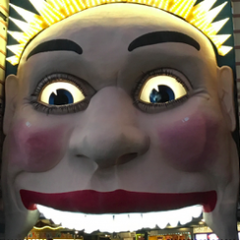
would be cool if the eyes lit up on the front1 point
-
This is what I've been wanting all along and I will not rest until the River Caves come back; reality be damned!!1 point
-
Ok can we please stop saying Zero Car? A piece of decorative plastic stuck on the front of the train is NOT a Zero Car, its just a front cowling. A zero car is the extra set of bogies/ wheel assemblies/ whatever you want to call them that finish off the train on a coaster that has single axel cars. Either at the front, or at the back. Without a Zero Car attached the train can't run because the end car would be dragging along the floor. So they added a piece of decorative plastic to the train is what they did.0 points



This leaderboard is set to Brisbane/GMT+10:00