


Leaderboard
-
Spectrumco
New Members3Points4Posts -
Smol bean
Members1Points595Posts


Popular Content
Showing content with the highest reputation on 18/01/26 in all areas
-
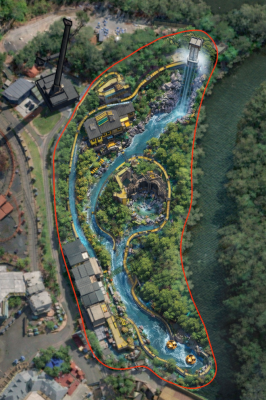
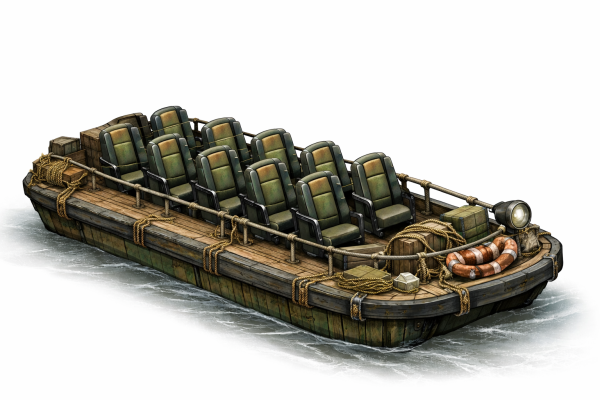
3 pointsFunnily enough, just after Bermuda launched at Futuroscope, I played around with AI to envision a rocking boat attraction in the MC plot. Theming-wise, the Tasmans have established an expedition base on the river after discovering the temple. Basically, riders are on rugged jungle barges headed to the latest uncovered ruins. The start of the ride is made up of a calm journey through the jungle with various animal scenes and a large cavern scene. Midway through, a storm warning is issued by the base, resulting in floodwaters hitting. The boat is swept off course and encounters a number of rapids, heading straight for a large waterfall i.e lift and splash down which is located at the Wild end of the plot. After the splash down, the expedition to the ruins continues, before returning to the station.
 3 points
 -
1 pointI think if dreamworld don’t intend on bringing a new ride onto the Murrissippi River, a bigger dark ride could fit into the area of Motocoaster if dreamworld was to properly allocate budget to hiding the show building from every angle outside RT. This could be done by planting trees and plants around the building that can hide it from all sides or area appropriate facades placed on the sides and back such as 1900s architecture on the side facing Main Street or a train yard facade to complement the Dreamworld Express and facades that match either GD or whatever themed land comes in to replace RH in the next decade or so on the back side.1 point


This leaderboard is set to Brisbane/GMT+10:00