


Leaderboard
-

New display name
Members14Points8,181Posts -
Ogre
Members2Points491Posts -
.jpeg.38bbfd67262889e30e5daba080f6b6c9.jpeg)
HarryHeHe8
Members1Points156Posts -

MickeyD
Members1Points1,519Posts


.jpeg.38bbfd67262889e30e5daba080f6b6c9.jpeg)
Popular Content
Showing content with the highest reputation on 16/07/26 in all areas
-
10 points
-
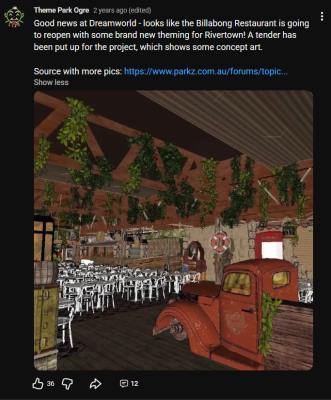
2 pointsSorry! Skipped my mind, as I thought it was more of a "public knowledge" type of post rather than a "we found this" post. I have often credited Parkz in the past, too:

 2 points
 -
2 pointsLOL, I’m not chasing the fame. I asked for Parkz to be credited. The Parkz community has always been pretty good at acknowledging sources when information comes from social media (like people on Parkz give your page credit if you are the source) . If Parkz is where the information originated, then it’s only fair that people using it as a source give credit back the same way. Keeps things fair for everyone. You’re actually one of the few who normally do give credit, so it is a bit unfair for me to lump you with the others.2 points
-
1 point
-
1 pointAnd It’s only fair, @Ogre , @themagician , and all the other social media scavenger birds who quietly circle these forums (some of whom never even drop a post) that if you’re going to swoop in and collect information from Parkz, at least give the source a little shout out.1 point
-
This belongs in RCT when you've had too many or can no longer be bothered to create your own facade, not DW. I also think the market stalls take away from DW and should all be moved to the troll village.1 point
-
^ same! I HATE this thing - it quintessentially represents a certain "Dreamworld chapter" that surely we'd all rather forget. Not to mention, has ZERO thematic cohesion to the world class efforts of King Claw. Put it in WWW & build a proper, "foot-long Hot Dog" Stand. For those of you old enough, you know I'm not talking about giant Dicks😁1 point


This leaderboard is set to Brisbane/GMT+10:00