
Skip to content

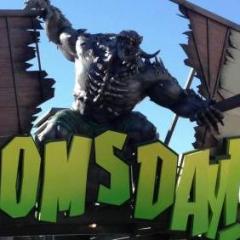
Dreamworld Ride Promo Images
Featured Replies

  • Author
22 minutes ago, themagician said:

@Gold Coast Amusement Force

FE8E39BD-FD6C-4DE6-891A-20F327C19546.thumb.jpeg.1eefe23b5a2592de7036670756ea0f8f.jpeg

And here’s another promotion image

1EB7E789-FB73-49B0-A264-7C4454813794.thumb.jpeg.4b34a9e09f6d01eb04391b4918087d89.jpeg

If you scroll through the archives of DWs FB photos, you’ll find a heap 

I was looking through dw’s Fb down to tot 2 and later but it’s just in terrible quality.

BA2353A9-A31B-4FF2-945D-17D82D2BB53E.jpeg

47BF6339-91DB-418A-8B4B-75B58585184A.png

B74AC59B-06E0-418B-BBE7-9740BB5D60D0.png

E94503E4-B39B-4345-B95D-EF1F2C6CF488.png

A521B576-CF3E-4202-8046-FDD085C5AFFE.png

Edited by Gold Coast Amusement Force

Join the conversation

You can post now and register later. If you have an account, sign in now to post with your account.
Note: Your post will require moderator approval before it will be visible.

Guest
Reply to this topic...

Recently Browsing 0

  • No registered users viewing this page.

Account

Navigation

Search

Search

Configure browser push notifications

Chrome (Android)
  1. Tap the lock icon next to the address bar.
  2. Tap Permissions → Notifications.
  3. Adjust your preference.
Chrome (Desktop)
  1. Click the padlock icon in the address bar.
  2. Select Site settings.
  3. Find Notifications and adjust your preference.