Jump to content

Featured Replies

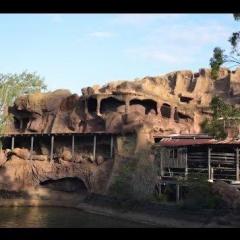
Does anyone have any pov footage of the Eureka Mountain Mine Ride at Dreamworld on the Gold Coast? If so, it would be greatly appreciated if you could send it to me as I have looked everywhere and only found one very shaky video.

A6ED5976-C32C-48F7-A739-040C33665C45.jpeg

CA9ADA9A-AFA4-4C6E-837C-83C47C0B4503.jpeg

F8143D86-2B5F-4CBA-AB6F-4BD4DDE63C5C.jpeg

Yeah pretty much given the age of the ride and when it last operated, between your one shaky video and AndrewH's old photos, that's about as good as you're going to get. Video cameras back 20 years ago weren't up to what current devices can do without being extremely bulky and oversized, which is also unlikely to be allowed on by a guest.

I can offer an alternative simulated experience though. 

Dark. Loud. Lift Hill. Noisy. Bright light. dark. bright light. dark. pitch black. sudden drop. scream. loud noises. sudden drop. sharp corners. hard laterals. brake run shoves your rib cage through your spine. the end.

On 1/1/2024 at 5:11 PM, HarryHeHe8 said:

I have looked everywhere and only found one very shaky video.


Where’d you find that one video. Even if it’s shaky I’d love to take a look myself.


  • Author
20 hours ago, Natti_amusements said:

Where’d you find that one video. Even if it’s shaky I’d love to take a look myself.


I found it on YouTube, it had the thunderbolt as its thumbnail and search up something like old dreamworld footage with super 8mm mine ride video.

The ads might be cheesy...but WOW....DW sure looked way better, back 'em there olden days....the layout and theming actually made sense!  🤗 

On 17/1/2024 at 10:38 AM, biasesumo said:

Wasn’t there a bloke here that said he was restoring old footage of this off old VHS tapes?

Yeah I thought so too.

Join the conversation

You can post now and register later. If you have an account, sign in now to post with your account.
Note: Your post will require moderator approval before it will be visible.

Guest
Reply to this topic...

Recently Browsing 0

  • No registered users viewing this page.

Important Information

By using this site, you agree to our Terms of Use. We have placed cookies on your device to help make this website better. You can adjust your cookie settings, otherwise we'll assume you're okay to continue.

Configure browser push notifications

Chrome (Android)
  1. Tap the lock icon next to the address bar.
  2. Tap Permissions → Notifications.
  3. Adjust your preference.
Chrome (Desktop)
  1. Click the padlock icon in the address bar.
  2. Select Site settings.
  3. Find Notifications and adjust your preference.